Every newsroom social team knows the problem. Instagram is where the audience is, but a caption can’t hold a clickable link. You point readers to the “link in bio,” and many of them never make it to the story.
Some publishers found a workaround: ask followers to comment a word, then DM them the link. It works, and followers now expect it. Doing it by hand, though, means someone copying and pasting URLs into DMs all night.
SND now does that for you. Comment-to-DM is available in the SND composer for Instagram feed posts, carousels and Reels.
How it works
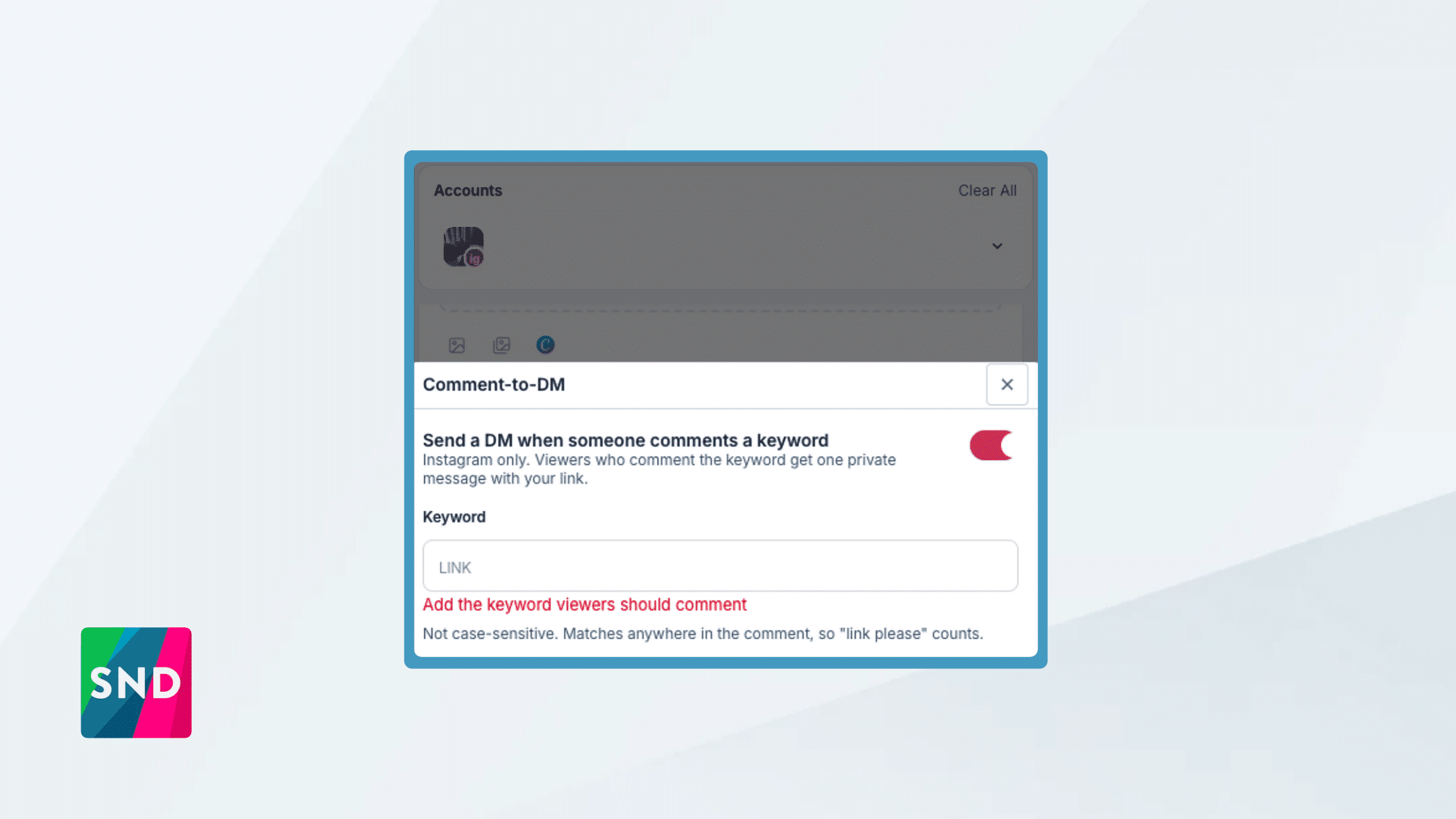
You pick a keyword: Add a keyword, a link and a short message when you build the post.
Followers comment it: “Comment STORY for the full investigation.”
SND sends the DM: Each commenter gets one private message with your link, usually within moments.
The setup lives in the composer, on the Instagram tab, right below Scheduled Comments. Turn on Comment-to-DM, type the keyword, paste the link, and write a message. We give you a starting message, and the preview shows exactly what a follower will see. Then publish or schedule as usual.
Forgot to set it up before the post went out, or a Reel took off after the fact? Open the post in Post Manager, choose Edit, and turn Comment-to-DM on. Every new comment with the keyword starts getting DMs.
Every comment becomes a direct path to your story.
Built for how newsrooms work
- One DM per follower, per post. People who comment twice don’t get spammed, and your account stays in good standing with Instagram.
- Your tracking, automatically. SND adds your existing Custom Link Tagging to every DM link, so Instagram DM traffic shows up in your analytics next to the rest of your social referrals.
- Forgiving matching. “Link,” “LINK” and “can I get the link?” all count, because followers don’t comment in all caps.
- Easy to find. Posts with an active trigger carry a badge in Post Manager, and a filter shows them all at once.
- Posting to several accounts? Set it once and it applies to every Instagram account on the post.
Ideas to try this week
- Investigations and long reads. Tease the finding in a carousel and let readers comment for the full piece.
- Election and weather guides. “Comment GUIDE for your ballot breakdown” works well when readers want something specific.
- Recipes, events and deals. Lifestyle content your audience wants to save.
- Newsletter sign-ups. Send the sign-up page instead of an article and grow your list from Instagram.
A tip on keywords: choose a word that won’t appear in comments by accident. Matching isn’t case-sensitive and looks for the keyword anywhere in a comment, so a distinctive word like GUIDE, RECIPE or STORY works better than a common one. And say it in the caption, because followers can only comment a keyword they know about.
Before your first post
Comment-to-DM works with Instagram professional accounts linked to a Facebook Page. Two quick checks for each account your team posts from:
- In the Instagram app on your phone: go to Settings › Messages and story replies › Message controls › Connected tools and turn on Allow access to messages. This is an Instagram setting, so SND can’t turn it on for you.
- In SND: if the account was connected before December 2025, reconnect it and approve the new messaging permission.
Comment-to-DM is in the Instagram tab of your composer now. For step-by-step setup, reach out to your Customer Success Manager.