By now, you’ve likely moved beyond the days of screenshots, copy-and-paste logging, and manually tracking conversations across platforms. You’re ready to implement a dedicated social media archiving solution—and that’s a smart move. If you’re still weighing the “why,” check out our earlier post.
But once you start evaluating vendors, another reality hits:
The market is crowded—and not every tool is built for government.
Many archiving platforms grew out of corporate or enterprise workflows. Municipalities have completely different needs:
-
- Public transparency
-
- Retention compliance
-
- Responding rapidly to public records requests
-
- Documenting conversations that evolve in real time
Choosing the wrong solution can lead to gaps in documentation, painful workflows, or worst-case—records that don’t hold up to scrutiny if challenged.
This guide breaks down the non-negotiables every municipality should use to evaluate social media archiving providers so you can make the right long-term choice for your agency.
Non-Negotiables: Capture, Context, and Verifiable Data
Not all archives are created equal. Storing a copy of a post isn’t enough. Government agencies need full, defensible, auditable records.
1. Demand Full Context
Social posts rarely exist in isolation. They grow, evolve, and sometimes disappear.
Your archiving software should capture:
✔ Posts
✔ Comments
✔ Replies
✔ Edits
✔ Deletions
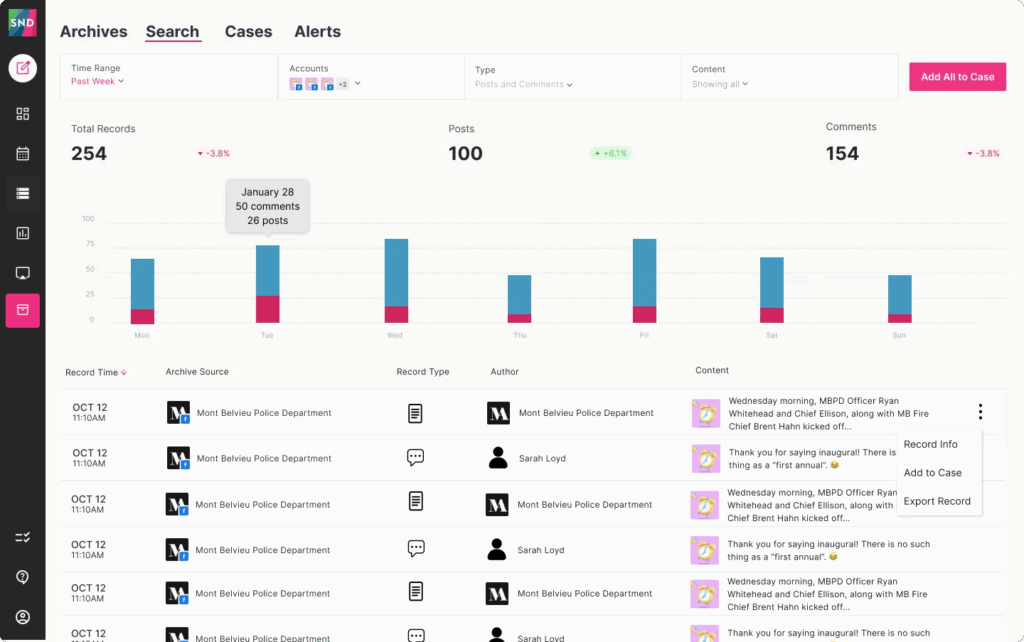
…and present them in a clean, readable format that mirrors the original platform. Without full context, you can’t fully defend what happened—or when.
2. The Metadata Test
If your archive is ever challenged, can you prove its authenticity?
Look for solutions that capture:
-
- Timestamps
-
- User IDs
-
- Digital signatures
-
- Source metadata
These details are critical for proving a record hasn’t been modified.
3. Real-Time Capture
Speed matters. If a post goes up and comes down in minutes, you still need a copy.
Ask:
-
- How often does the archive sync data?
-
- Does it track activity continuously or only in scheduled batches?
-
- Can it capture “blink and it’s gone” content?
4. Platform Coverage
You shouldn’t have to patch together multiple tools just because your audience interacts across different networks.
Your archive should support every platform your municipality relies on, including:
-
- X
-
- Nextdoor
-
- Threads
-
- TikTok
-
- Bluesky
-
- YouTube
If a vendor can’t support your full ecosystem today, future growth becomes an immediate headache.
Saving Time: Features That Simplify Your Team’s Life
Yes, archiving is about compliance—but it should also make your work easier, not harder.
1. Powerful Search
Some archiving tools only allow filtering by date range (common among low-cost and legacy systems). That’s not helpful when you’re scrambling to answer a records request.
Your archive should allow:
-
- Keyword search
-
- User lookup
-
- Platform filtering
-
- Thread-level exploration
If you can’t search deeply and quickly, the tool slows you down instead of helping.
2. An Interface Everyone Can Use
From Comms… to PIOs… to IT… everyone should be able to log in and work without hours of training or complicated workflows.
Ask vendors:
-
- How long does onboarding take?
-
- Can new users navigate intuitively?
-
- How many clicks does it take to retrieve and export a record?
If the UI feels like homework, adoption will suffer.
3. Flexible Export Options
Your archive needs to support the formats agencies actually use, such as:
-
- HTML
-
- CSV
-
- Full threaded print views
When an open records request comes in, your archive should allow you to gather and format everything cleanly—in minutes, not days.
4. Built-In Monitoring
Some platforms can alert you to:
-
- Flagged words or phrases
-
- Inappropriate content
-
- Escalating comment threads
This turns your archive into a proactive tool—not just a reactive one—helping your team manage public interactions more responsibly.
Choosing a Partner, Not Just a Product
When evaluating vendors, don’t just assess the software—assess the relationship.
1. Vendor Focus
Is the provider dedicated to government workflows—or simply repurposing an enterprise product?
Government archiving has unique expectations and accountability requirements. Look for a vendor with proven public sector experience, like Social News Desk, which focuses heavily on agency needs.
2. Security & Storage Practices
Any responsible solution must demonstrate:
-
- Encrypted storage
-
- Controlled access
-
- Audit trails
-
- Safe hosting environments
You’re storing public records—security is nonnegotiable.
3. Built for Growth
Social platforms change. Accounts expand. Volume increases. New networks emerge.
Your archiving provider should scale with you without expensive rebuilds or migrations.
4. Human Support
When you need help, you shouldn’t be stuck with generic documentation or a ticket queue that never answers.
Ask vendors:
-
- Who trains new users?
-
- Is support U.S.-based?
-
- Do you have a dedicated account representative?
Your agency deserves a partner—not a self-service maze.
Find the Right Fit for Your Agency
Selecting the right social media archiving solution comes down to three big pillars:
-
- Data Integrity – Every detail, fully captured, fully provable.
-
- Workflow Simplicity – Fast searches, easy exports, and intuitive use.
-
- Vendor Reliability – A partner committed to public-sector requirements.
Ultimately, the best archiving system is the one that gives your team confidence—knowing every interaction is captured accurately, securely, and with minimal effort.
Ready to see what a government-focused solution looks like? Explore Social News Desk’s archiving features.
Want a hands-on look? Request a demo and see how SND can support your municipality today.