Social media moves fast, but accessibility can’t be an afterthought. Even with Social News Desk’s streamlined “All” tab workflow in Post Composer, small details – like alt text – can slip through the cracks. That’s why we’ve improved the workflow, making it simpler and faster to add alt text directly in the “All” tab, so every image in your posts is clear and understandable to everyone, including people with visual impairments.
Alt text might feel like a small detail, but it has a big impact. Screen readers rely on it, it provides context when images don’t load, and it can even help with search. With SND, adding alt text is built into your workflow – now more streamlined than ever – so accessibility doesn’t slow you down.
Images are everywhere – photos, graphics, infographics, screenshots – you name it. Without alt text, people using screen readers can miss important content entirely. Alt text fixes that, giving every image a voice.
It’s also a win for content creators. Clear descriptions make sure your message comes through even if images don’t load, and they add useful context for search and accessibility. It’s not just about compliance – it’s about creating a richer, more inclusive experience for everyone who sees your posts.
The “All” tab lets you compose one post and publish it across multiple networks in a single workflow – saving time and keeping messaging consistent.
Streamlined Alt Text in the “All” Tab
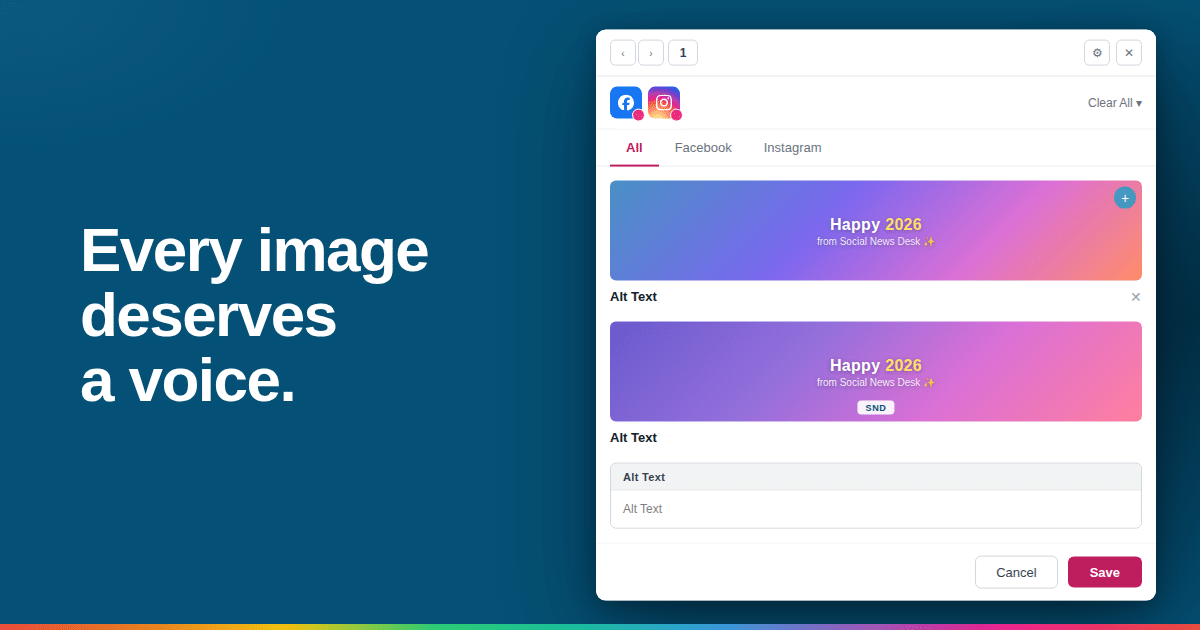
Alt text has always been supported in SND, but now it’s easier than ever to add it directly in the “All” tab. Attach an image, and a dedicated field appears for each image. The description you enter automatically applies across all platforms that support alt text – no extra clicks, no repeated work.
Here’s what’s improved:
- One field per image: Every image gets its own description, making multi-image posts easier to manage.
- Automatic application: Add it once, and it applies wherever possible.
- Customizable when needed: Want a platform-specific description? You can tweak it.
- Editable until posting: Make last-minute updates anytime.
- Character limit guidance: Each platform has different rules – we’ll alert you if your description is too long.
This update keeps your workflow smooth, reduces mistakes, and makes accessibility effortless.
Accessibility Benefits
Alt text isn’t optional – it’s essential for inclusive social media. With the improved workflow in the “All” tab, accessibility is built right into every post.
Key benefits:
- Better experience for screen reader users: Every image has a descriptive label.
- Clarity for all users: If images fail to load, alt text communicates the key message.
- Consistency across platforms: One description keeps messaging coherent everywhere.
Even if your team isn’t required to add alt text, this improved workflow makes accessibility a natural part of content creation.
Making Accessibility a Natural Part of Social Media
Alt text isn’t just a technical requirement – it’s a chance to make your content inclusive, understandable, and user-friendly. With the improved “All” tab workflow, adding alt text is effortless and built into your everyday process.
At SND, our goal is to make social media posting intuitive, efficient, and inclusive. Every image can now tell its story, reaching audiences who might otherwise miss important content.
Accessibility and efficiency don’t have to compete. The improved alt text workflow in the “All” tab means you can post across platforms faster, more consistently, and more inclusively. Every image is clearly described, helping all users engage with your content and creating a richer social media experience.
If you’re interested in learning more about Social News Desk, reach out to our team today!