
One of our most-requested features ever is now LIVE in SND Dashboard – Post Meta-Tagging!

This new feature allows you to tag posts by category, subject, or post type. There are two ways to tag a post: when creating content, or after content has been sent out.
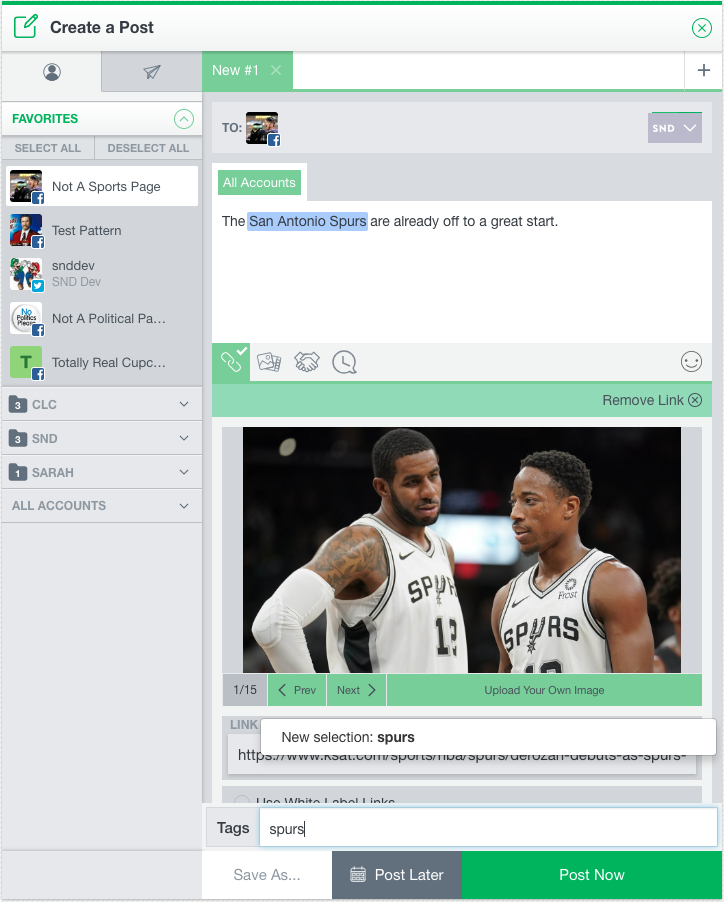
To tag a post when you’re creating it, look at the bottom of your post composer. You’ll now see a simple tag entry form. Start typing, and you’ll either be able to create a new tag or search for one that’s been created already.
Once the post goes out, tags will appear in Post Manager with the post text, so you can see the tags you’ve been using at a glance.

You’ll also be able to open the post preview in order to view or modify tags, or to retroactively add tags to posts that don’t have a tag assigned already. Try it out!

Once you’ve tagged your posts, you can use Post Manager to quickly filter for posts containing a certain tag. This feature makes it simple to group together posts around certain verticals (lifestyle, sports, weather, crime, evergreen) or even specific topics. We’ll have more ideas for using tags very soon – and we can’t wait to see how you use this brand new feature!