If you’ve recently run into issues scheduling or publishing branded content on Instagram or Facebook, you’re not alone. Meta quietly changed where Branded Content partnerships are managed — and it’s causing a lot of confusion for brands, agencies, and creators alike.
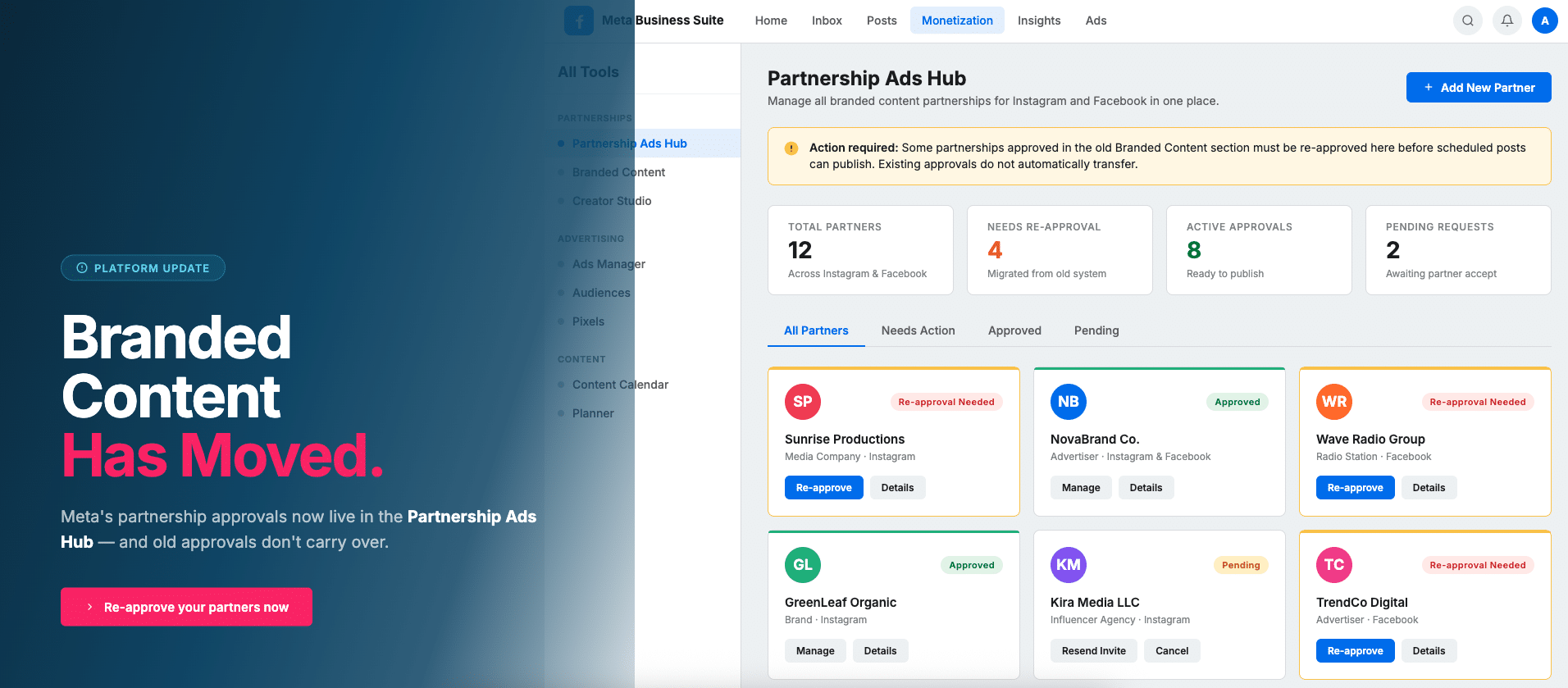
Even if you’re only posting organic branded content (not paid ads), all partnership approvals now need to happen inside Meta’s new Partnership Ads Hub. The old system is no longer the main control center, and many existing partnerships won’t work until they’re re-approved in this new location.
First, What Is “Branded Content”?
Branded content is any social media post where a creator, publisher, or business is promoting or featuring another brand in exchange for payment, free products, sponsorship, or some other form of partnership. If you’re not using it already, you should.
Common examples of branded content include:
-
- A radio station posting about a local business that sponsors a segment
- An influencer tagging a brand they’re being paid to promote
- A publisher sharing content created in collaboration with an advertiser
- A business promoting a partner brand as part of a co-marketing campaign
In Meta’s ecosystem (Facebook and Instagram), branded content is regulated through official partnership tools. These tools exist for two main reasons:
-
- Transparency: So audiences can clearly see when a post is sponsored.
- Permissions: So brands and creators can legally and technically collaborate on content.
When a post is marked as branded content, it usually includes a “Paid partnership with…” label at the top. Behind the scenes, that label only works if both parties are properly approved as partners in Meta’s system.
Who Does This Affect?
This change impacts a wide range of users, including:
-
- Influencers and creators
- Brands and advertisers
- Agencies managing content for clients
- Publishers, radio stations, and media companies
- Anyone using third-party scheduling tools
If your business ever tags another brand in a sponsored post — or gets tagged in one — this applies to you.
What Changed?
Previously, branded content partners were approved in the Branded Content section of Meta Business Suite. That area acted as the main place to manage who could tag who.
Meta has now moved everything into a new location called the Partnership Ads Hub. The biggest issue: Old approvals do not always carry over. So even if a partnership looks approved in the old section, it may no longer be valid or functional under the new system.
Why This Matters
If your partnerships aren’t approved in the new hub, several things can break:
-
- Branded posts may fail to publish
- Scheduled content can get stuck or error out
- “Paid partnership” labels may not appear
- Third-party platforms (like Hootsuite, Sprout, or other schedulers) may stop working
- From a workflow perspective, this can be frustrating because nothing appears obviously wrong — posts just don’t go through.
From a compliance perspective, it’s also risky. If branded content isn’t properly tagged, it may violate Meta’s policies or advertising guidelines.
How to Fix It (Step-by-Step)
This is a quick, one-time fix for each partnership.
- Go to Meta Business Suite
- Click All Tools
- Open Partnership Ads Hub
(or just search for “Partnership Ads Hub”) - Look for your branded content partner
- If they’re not listed:
-
-
- Add or approve them inside the Partnership Ads Hub
-
- Do not use the old Branded Content section
Once the partnership is approved here, your scheduled branded posts should start working again.
Important Things to Know
-
- Partnerships approved in the old system must be re-approved
- This only needs to be done once per partner
- This applies to organic posts too, not just paid ads
- Both sides must accept the partnership for it to work
- You may need admin or business-level access to complete this
If you manage multiple clients or partners, each one needs to be added individually.
Why Meta Made This Change
Meta is gradually unifying branded content and advertising tools into a single system. The Partnership Ads Hub allows them to:
- Track partnerships more consistently
- Enable easier boosting and amplification of branded posts
- Improve transparency for users and regulators
- Centralize creator-brand relationships
While the intention is to streamline things long-term, the rollout has been confusing because Meta didn’t clearly communicate the shift.
The Bottom Line
Meta didn’t remove branded content — they just moved the controls. If your branded content suddenly stopped working, the fix is simple: Re-approve your partners in the Partnership Ads Hub. Once that’s done, everything should function normally again — including scheduling, publishing, and paid partnership labels.
If you work with brands or creators regularly, it’s worth checking this now before something breaks in the middle of a campaign.
Have Questions? Our Client Success Team Can Help
If you’re unsure whether your partnerships are set up correctly — or if your branded content is failing to publish — our Client Success team is here to help. Reach out to your Client Success Manager or contact our team for assistance at support@socialnewsdesk.com.
We’re happy to review your setup and ensure everything is configured properly inside the new system.